

How to command meetings better than 99% of managers
Video call platforms provide not only a place to meet, but a real record of our interactions - the transcripts. Here's how to harness them to their fullest.


What you’ll get from this article
An agentic skill to apply daily (or as frequently as you’d like - I set it to run every evening at 7pm after finishing my workday) to coach your abilities to correctly set the stage of a meeting, elegantly steer its flow, and conclude sessions with clarity.
By incorporating this skill into your workflow, you will be able to:
use meeting transcripts as the critical input for the agent, so that it identifies weak spots in your communication;
get a no-BS, direct debrief after every call, using criteria that are tracked over time;
go into every call with one specific thing to practice, automatically scheduled for the next morning;
get agentic feedback whether you’re actually improving or not.
What you need
A workspace where transcripts land (pick one!):
Notion: native with Notion AI, or paste manually after any call;
Google Workspace: Google Meet + Gemini Notes saves transcripts to Drive automatically;
Microsoft 365: Teams meetings generate transcripts to SharePoint.
This article focuses on the integration with Notion and Claude Code, where I have both my call transcripts and the calendar integration.
Tooling:
Claude Code (the agent runs as a
/comm-coach-auditorslash command);Notion MCP connected to Claude Code;
Google Calendar connected to Claude Code.
Your time:
20 minutes to write your
skill.mdfile: the rubric that tells the agent what to look for. Explained in the next section.
The Skill.md file
This is the most important piece: the agent reads your transcript against this file, so what you put in it determines what it finds.
I put the following dimensions:
Clarity of recommendation. After this call, does the listener know what to do, or at minimum what to think? A call that ends without a clear takeaway is a communication failure.
Loop closure. Every question that opens in a conversation should either get answered or explicitly deferred. Open loops at the end of a call are ambiguity the listener has to carry.
Setting the context. Is the technical content anchored to decisions the listener actually faces? No clear context means working on the wrong things.
However - we can’t continue without you writing your own Skill.md! It sets the communication dimensions that depend strictly on your role and who you’re talking to. Vague criteria produce vague feedback 👎🏻
Have a look at my Skill.md and use it as a template to craft your own:
# Communication Skill Dimensions

## Clarity of recommendation
After this call, does the listener know what to do, or at minimum what to think?
A call that ends without a clear takeaway is a communication failure, regardless of how much was said.

## Loop closure
Every question that opens in a conversation should either get answered or explicitly deferred.
Track the ratio of questions raised to questions resolved. Open loops at the end of a call
are ambiguity the listener has to carry.

## Setting the context
Is technical content anchored to decisions the listener actually faces?
"The provisioning latency is within acceptable range" is not grounded.
"At current scale we're provisioning 10 VMs in under 8 minutes — which means your
product team's 30-minute window is comfortable" is.
There is no right or wrong set of communication dimensions, the important thing is to make it your own. It doesn’t have to be perfectly crafted right off the bat - I did many iterations of my Skill.md before posting it here. In the end, you also want to use the agent to uncover any communication flaws so that you’re aware of them.
The agent
Save the following as ~/.claude/commands/comm-coach-auditor.md to make it available across all your projects, or in .claude/commands/comm-coach-auditor.md to scope it to one workspace. Invoke it by typing /comm-coach-auditor in Claude Code.
# Comm Coach Auditor

> Audits today's 1:1 and technical sync transcripts against a defined skills file. Appends a structured assessment to a running Communication Capabilities Journal and schedules a private Comms Prep block in Google Calendar for the next workday. Use when you want structured, transcript-grounded feedback on how clearly you communicated — not a general impression, a scored evaluation with specific quotes. Do not use without a skills file in place, and do not use for real-time coaching or sessions where no transcript exists.

## Configuration

```
SKILLS_FILE:   ~/ai/business/skill.md             # path to your skills file
JOURNAL_TITLE: Communication Capabilities Journal # exact title of the journal page in Notion
PREP_TIME:     10:00                              # local time for the Comms Prep calendar block
PREP_DURATION: 30                                 # minutes
```

Adjust `SKILLS_FILE` to wherever you keep your skills file before running. The agent reads it in step 3 and anchors every scoring decision to it. If the file does not exist, the agent will ask before proceeding.

<!--
TEMPLATE NOTE FOR READERS — Notion + Google Calendar is the stack wired up here, but you can
swap any step for the following alternatives with minimal changes:

  TRANSCRIPT SOURCE (step 2)
  • Google Drive    — tools: mcp__claude_ai_Google_Drive__search_files,
                             mcp__claude_ai_Google_Drive__read_file_content
                     Use when: transcripts land as Google Docs via Gemini Notes after Google Meet.
                     Search for "Transcript:" or "Meeting notes:" in the filename.

  • Microsoft 365   — tools: Microsoft Graph MCP server (SharePoint, Teams messages)
                     Use when: transcripts land in SharePoint via Teams transcription.
                     Filter by today's date and meeting title prefix.

  JOURNAL (step 6)
  • Google Drive    — Create/append to a Google Doc named JOURNAL_TITLE.
                     tools: mcp__claude_ai_Google_Drive__create_file,
                            mcp__claude_ai_Google_Drive__read_file_content,
                            mcp__claude_ai_Google_Drive__download_file_content
  • Local file      — Read/append to a local markdown file (e.g. ~/ai/business/comm-journal.md).
                     tools: Read, Edit

  CALENDAR (step 7)
  • Google Calendar — wired up below. Uses mcp__claude_ai_Google_Calendar__create_event.
  • Notion          — Create a page titled "Comms Prep — [YYYY-MM-DD]" in your workspace.
                     tools: mcp__claude_ai_Notion__notion-create-pages
  • Manual          — Output the event details as plain text for the user to schedule manually.
-->

## Overview

This skill guides the agent in auditing today's meeting transcripts for communication quality. It reads each transcript against the dimensions in the skills file, identifies the top weak points with exact transcript quotes, logs the assessment to a running journal, and creates a focused practice block in the calendar for the next morning.

The output is not a general impression. It is a scored, quote-backed evaluation with a concrete drill for each identified gap.

## Workflow

1. **Identify today's meetings**: Use `mcp__claude_ai_Google_Calendar__list_events` to retrieve today's calendar events. Filter for 1:1s and technical syncs — events with 2 attendees, or titles containing "sync", "1:1", "check-in", "catchup", "debrief", or a person's name.

2. **Locate transcripts**: For each meeting identified, use `mcp__claude_ai_Notion__notion-search` to find the corresponding transcript or meeting notes page. Search for:
   * The exact meeting title
   * Common prefixes: "Transcript:", "Notes:", "Meeting notes —", participant name + today's date

   Note any meetings with no transcript found and continue. Do not stop on a missing transcript.

3. **Load the skills file**: Use the Read tool to load the file at `SKILLS_FILE`. If it does not exist, ask for its location before proceeding. Every scoring decision in step 4 must anchor to this file — do not improvise criteria.

4. **Analyze & assess**: Fetch each transcript with `mcp__claude_ai_Notion__notion-fetch`. Score each transcript against every dimension defined in the skills file loaded in step 3. Apply the criteria exactly as written — do not add, substitute, or skip dimensions. If you think a dimension is missing from the skills file, flag it to the user at the end of the session rather than improvising.

5. **Identify the top 2-3 weak points**: Name each pattern explicitly across all transcripts reviewed. Quote the exact line where it occurred. Explain what it cost the listener. No generalizations — specific quotes only.

6. **Update the Communication Capabilities Journal**: Search Notion for a page matching `JOURNAL_TITLE`.
   * If it does not exist, create it with `mcp__claude_ai_Notion__notion-create-pages`.
   * Append today's entry at the end with `mcp__claude_ai_Notion__notion-update-page`:
     ```
     ## [YYYY-MM-DD] — [Meeting title(s) reviewed]

     **Strong:**
     - [what worked + specific example from transcript]

     **Weak points:**
     - [Pattern 1]: "[exact quote]" — [what this cost the listener]
     - [Pattern 2]: "[exact quote]" — [what this cost the listener]
     - [Pattern 3 if applicable]

     **Recommendations:**
     - [Concrete drill for Pattern 1 — an actual alternative phrase, not a principle]
     - [Concrete drill for Pattern 2]
     ```

7. **Schedule Comms Prep**: Create a Google Calendar event with `mcp__claude_ai_Google_Calendar__create_event`:
   * **Title**: Comms Prep
   * **Date**: Next workday (skip Saturday and Sunday)
   * **Time**: `PREP_TIME` local time, duration `PREP_DURATION` minutes
   * **Visibility**: Private
   * **Description** (plain text, no markdown): the specific communication patterns to train on from the weak points above + for each pattern a concrete example of what better looks like — an actual phrase to rehearse, not a principle to remember.

## Guidelines

* **Quote the transcript**: Every weak point must be backed by an exact line. "Communication was unclear" is not feedback. "You said 'latency is within acceptable range' without establishing what range the client cares about" is.
* **Score, don't just describe**: Be specific, no-BS sugar coating. Brutal honesty.
* **One criteria set, every session**: Scoring against the same skills file each time is what makes sessions comparable over weeks. Do not improvise new criteria — flag gaps to the user instead.
* **Comms Prep description is the product**: The calendar event description is what the user reads the next morning before practicing. Write it last, make it specific, and make it actionable. A vague description defeats the purpose of the whole workflow.
* **Missing transcripts are not blockers**: Note them, assess what you have, and flag the gap at the top of the journal entry.

## Skills file

The skills file is a plain text or markdown file that defines what good communication looks like in your specific context. It is read in step 3 and used as the scoring anchor throughout the session.

## References

* Google Calendar: `mcp__claude_ai_Google_Calendar__list_events`, `mcp__claude_ai_Google_Calendar__create_event`
* Notion (transcripts + journal): `mcp__claude_ai_Notion__notion-search`, `mcp__claude_ai_Notion__notion-fetch`, `mcp__claude_ai_Notion__notion-create-pages`, `mcp__claude_ai_Notion__notion-update-page`
* Google Drive alternative: `mcp__claude_ai_Google_Drive__search_files`, `mcp__claude_ai_Google_Drive__read_file_content`
* Microsoft 365 alternative: Microsoft Graph MCP server — SharePoint and Teams transcription
The Notion MCP connection handles transcript retrieval, journal updates, and a timeblock for following up on my communication flaws. I call it “Comms Prep” and the agent schedules it automatically.
Important: you have to make sure that your transcripts land in Notion before the agent is run.
The agentic output
Here’s a real entry from my Communication Capabilities Journal, generated after a client infrastructure review and a coaching 1:1:
2026-05-12 — Client Infrastructure Review · Coaching 1:1
Meetings reviewed: 2 of 2 transcripts found.
Strong:
Loop closure — Client Infrastructure Review: every open item from the previous call was addressed. Each was either resolved with a specific answer or explicitly parked with an owner and a date. The client left with zero ambiguous threads.
Weak points:
Setting the context (Client Infrastructure Review): “At current scale we can handle this migration in two phases without impact to availability.” — The client’s actual concern was whether the first phase could land before their Q3 deployment freeze, not availability in general. No context was established for what constraint the recommendation was responding to. The client had to ask a follow-up to connect the answer to their timeline. That question should not have been necessary.
Setting the context (Coaching 1:1): “You need to lead with what this means for the client’s team, not the technical approach.” — Said without first establishing what the engineer understood about the client’s priorities. The feedback landed as a principle with no frame to attach it to. It was not actionable until the engineer asked a clarifying question.
Pattern across both sessions: 4 of 6 substantive statements assumed context the listener had not confirmed they held. Setting the context is the dimension to work on.
Recommendations:
Setting the context: before stating any finding, say what decision or concern it is responding to. “You’re deciding whether to start before the Q3 freeze — here’s what’s relevant to that: [finding].” This is the opening move for every technical update. Rehearse it as a fixed habit, not a situational choice.
Coaching 1:1 — before giving feedback, ask one question to surface the shared frame: “What do you think the client is most worried about going into this call?” If they know, you’ve confirmed the frame and can move fast. If they don’t, the gap is visible before you try to fill it.
Loop closure: replace “we’d follow the standard runbook” with: “The rollback procedure for phase 1 is [specific steps]. I’ll confirm this in writing by [date].” Name it. Commit it. Close it.
That’s the best part - you can’t self-assess accurately in real time, but the agent creates your awareness about where you’re excelling and where you’re falling short, based on the call transcriptions.
The calendar training slot
The agent creates by default a 30-minute slot in the calendar at 10:00 local time, with specific instructions what to focus on:
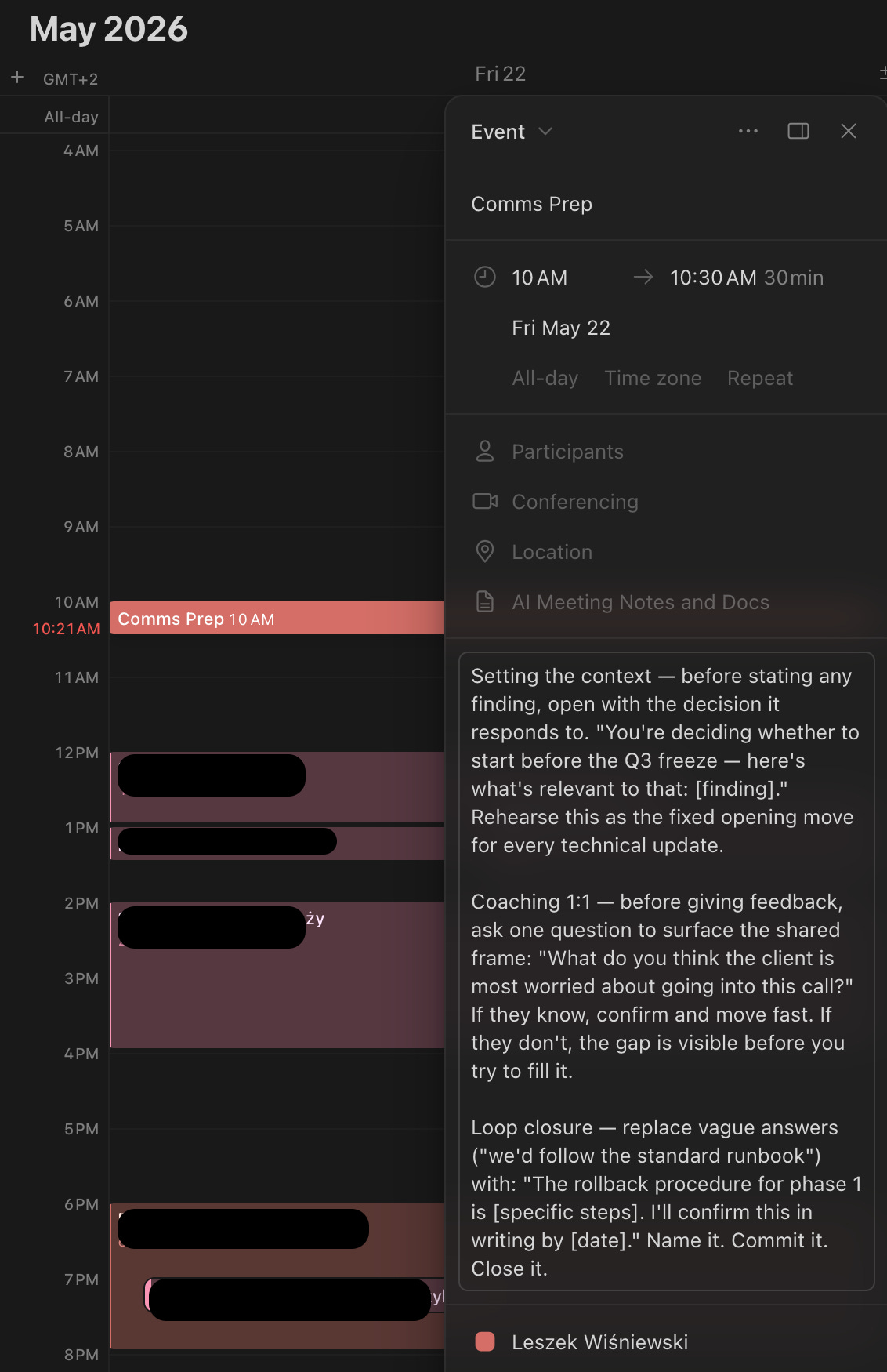
After three weeks, I’m improving on one dimension. The other two are moving more slowly. I now know which one to focus on next week. Before this, I was guessing.
On the data source
The agent works from wherever your transcript lands in Notion:
Notion AI integration for calls recorded natively in Notion;
Gemini Notes in Google Drive if you’re in a Google Workspace environment - transcripts land in Drive automatically after Google Meet calls, and you can sync them to Notion via a simple automation; you can make it even more simple by accessing the G Drive directly using the Workspace MCP Servers.
Microsoft Teams transcription if that’s your stack – transcripts go to SharePoint, push them to Notion via Power Automate or Zapier.
The skill.md file and the Comms Prep scheduling step work the same regardless. The only variation is how the transcript gets into Notion in the first place.
I share the tools and techniques that I apply on my job every day - let me know what you think of the Comm Coach Auditor agent. Also, please reach out to me if you’d like to further fine tune it or have trouble getting it configured the way that you want it - I will gladly help!